Nailing AI vs Canva: which one your carousel needs.
Nailing AI and Canva both make Instagram carousels, from opposite ends. Canva is a design editor: you pick a template and build the slides, with AI helping inside. Nailing AI is an AI canvas: it reads your reels, videos, PDFs and notes, then writes and designs the carousel from them. If the words are the hard part, start here.
Checked 24 Sep 2026Canva's strengths firstSources linked
Canva
a design editor with AI inside.
Millions of templates, brand kits, team approvals and scheduling (not Instagram carousels). You lay out each slide; Canva AI helps with text and images.
Nailing AI
an AI canvas that writes from your material.
Reels, videos, PDFs and notes go in. A finished 1080×1350 carousel in your voice comes out, and you change it by asking.
in short.
- Canva is best for
- Designing anything by hand from a huge template library, alone or with a team.
- Nailing AI is best for
- Turning what you have already said, filmed and saved into carousels that sound like you.
- Making the carousel
- Canva: a multi-page design you build; Canva's own AI pages show no dedicated carousel generator; for one prompt there is the third-party Carousel Studio app. Nailing AI: written and designed from your sources, 2 to 20 slides, cover first.
- Video links
- Canva: no link transcription found; Video to Text captions your uploads. Nailing AI transcribes Instagram, TikTok and YouTube links for free.
- Posting
- Canva schedules to Instagram, Facebook, X, LinkedIn, Pinterest and more on paid plans, but not carousels on Instagram. Nailing AI does not post.
- Turkish
- Both have a Turkish interface.
- Price
- Canva: free plan, Pro $18/mo. Nailing AI: 250 free credits, then from $24/mo.
feature by feature.
What each tool does for an Instagram carousel, from the source material to the posted slides.
| Nailing AI | Canva | |
|---|---|---|
| What it is | An AI canvas for content | A design platform with AI |
| Starts from | Your reels, videos, PDFs, web pages and notes | A template, a blank page or a prompt |
| Carousel from one request | ✓ yes | Through the Carousel Studio app (third-party) |
| Transcribes Instagram, TikTok and YouTube links | Yes, free; scene analysis for Instagram and TikTok | Not found (Video to Text captions uploads) |
| Learns how you write | From the posts you connect; brand profile on paid plans (beta) | Brand Voice on paid plans |
| Takes the look of a reference | Layout, palette and type of any carousel, never its words | Style Match copies a visual style between elements |
| Reels scripts | ✓ yes | General writing with Magic Write |
| Competitor analysis | Paid plans: top reels of up to 3 accounts | — no |
| Edit by hand | No: you tell the AI what to change | ✓ yes |
| Template library | — no | Millions of templates |
| Scheduling and posting | — no | Content Planner, paid plans; not Instagram carousels |
| Team seats | — no | ✓ yes |
| Turkish interface | ✓ yes | ✓ yes |
| Free plan | 250 credits once, watermark | ✓ yes |
| Paid plans from | $24/mo | $18/mo |
Competitor facts read from their own pages on 24 Sep 2026. canva.com/pricing · Canva AI · Brand Voice · Content Planner · Scheduling on Instagram · Style Match · Video to Text · Carousel Studio
where Canva is stronger.
- Design range. Millions of templates, photos, videos and graphics, and every element on a slide can be moved and restyled by hand.
- Teams. Brand kits, team collaboration and approvals for many people on one account.
- Publishing. The Content Planner schedules posts to Facebook Pages, Instagram business accounts, X, LinkedIn, Pinterest and more, on paid plans. On Instagram that means single images and videos: its help page says carousels, Reels and Stories can't be scheduled there.
- Everything else. It is a general design platform, and Canva Whiteboards, for brainstorming, sits in the same account.
If your carousel copy is already written and you want control over every pixel, Canva is the better tool, and Nailing AI will not replace it.
it reads before it writes.
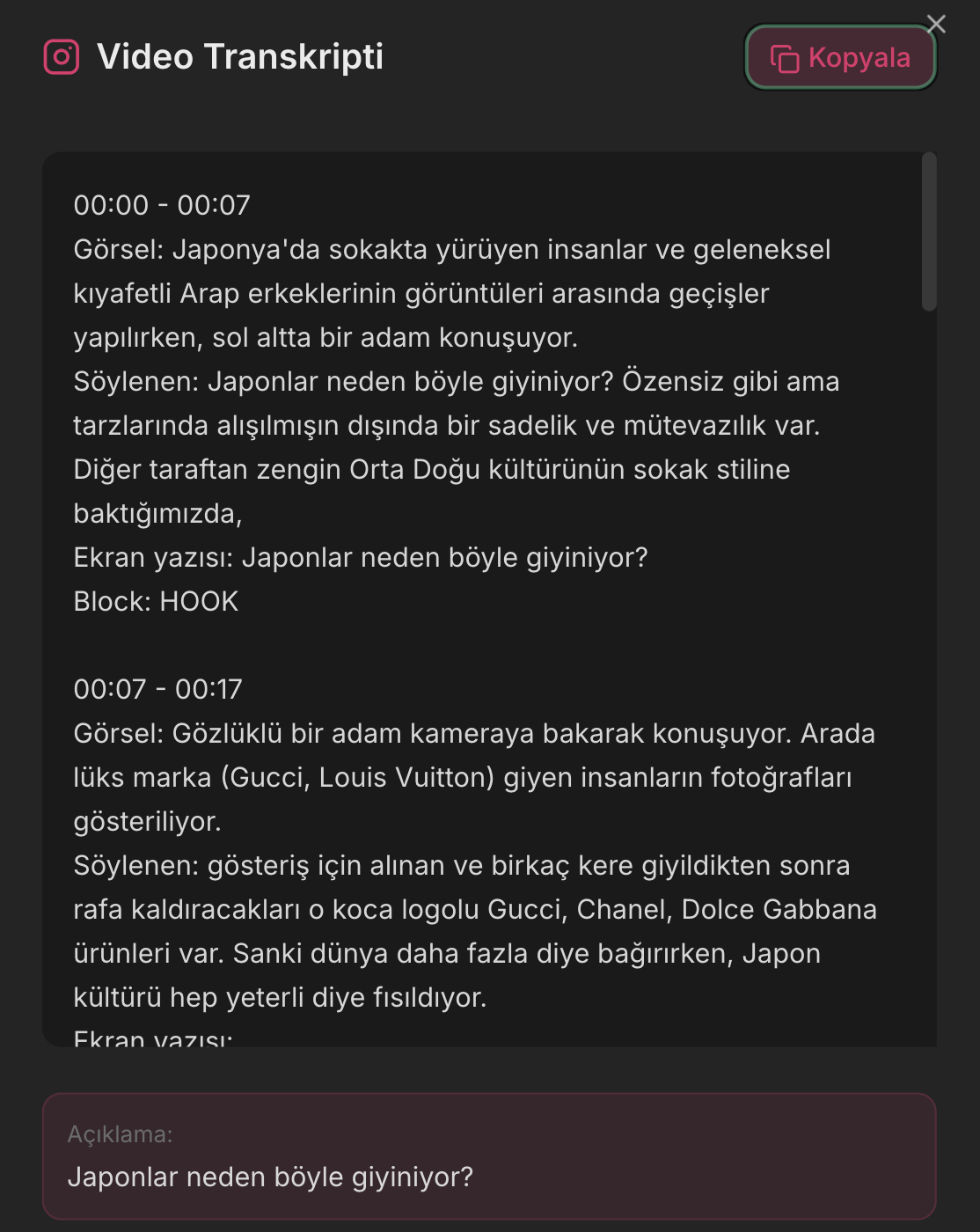
Drop an Instagram reel or a TikTok on the canvas and the transcript and scene analysis come back for free: what is said, what is shown and the text on screen, with timestamps. YouTube links get a free transcript. PDFs, web pages, notes and voice notes sit on the same board.
Connect the sources that matter to the chat and ask for a carousel. The AI writes from them, in your voice: from the posts you connect and, on paid plans, from a brand profile (in beta) with your tone, the phrases you actually use and your do's and don'ts. It then designs the deck, cover first, in the 1080×1350 Instagram format.
Like the look of someone else's carousel? Add it as a reference: your deck takes its layout, palette and type, and its words are blanked before writing starts. Recreating what works →
which one to pick.
Pick Canva if
- you already know what to say and need it designed,
- you want to adjust every element by hand,
- you work with a team that approves designs,
- you want scheduling in the same tool, for posts other than Instagram carousels.
Pick Nailing AI if
- the writing is the hard part,
- your ideas live in reels, videos, PDFs and notes,
- you want the copy to sound like you, not like a template,
- you want to learn from reels and carousels that already work.
Or use both. Nailing AI exports each slide as a PNG and a whole deck as a ZIP. Post them as they are, or bring them into Canva to add a logo, a sticker or a slide you design by hand.
what each costs.
Canva: free plan with limited AI uses. Pro is $18 a month or $144 a year. Business is $25 per person a month or $250 per person a year. Enterprise is priced on request. Carousel Studio, the third-party carousel app, is billed separately on its own site.
Nailing AI: 250 welcome credits once, with no card; images made on the free plan carry a small watermark. Starter is $24 a month ($240 a year) with 4,000 credits, Creator $39 with 10,000, Pro $99 with 27,000. Transcripts and scene analysis are free, and yearly plans can be refunded in full within 14 days.
A note on the word: Nailing AI calls its workspace a canvas because sources, chat and results sit side by side on one infinite board. It is not related to Canva. For more options, see Canva alternatives for carousels and the best AI carousel generators of 2026.
asked often.
Is Nailing AI better than Canva for Instagram carousels?
They solve different parts of the job. If you know what to say and want to design it yourself, Canva is the stronger editor. If the words are the hard part and your ideas live in reels, videos and notes, Nailing AI writes and designs the carousel from them, in your voice.
Is the Nailing AI canvas related to Canva?
No. Nailing AI calls its workspace a canvas because it is an infinite board where your sources, the AI chat and your carousels sit side by side. It is a separate product, built in Istanbul.
Can Canva turn a reel or a YouTube video into a carousel?
Not that we found. Canva's pages show no way to transcribe an Instagram, TikTok or YouTube link; its Video to Text feature captions videos you upload or make in Canva. Nailing AI transcribes those links for free and writes the carousel from what was said.
Does Canva have an AI carousel generator?
Canva builds carousels as multi-page designs from its templates, with Canva AI helping inside the editor. For a carousel from a single prompt there is Carousel Studio, a third-party app in the Canva marketplace with its own billing.
Can I finish a Nailing AI carousel in Canva?
Yes. Download the slides as PNGs (a ZIP for the whole deck) and upload them to Canva to add anything by hand. Inside Nailing AI, every change goes through the AI: you say what to change and it redraws that part.
Which one is cheaper?
Both have a free plan. Canva Pro is $18 a month or $144 a year. Nailing AI starts at $24 a month for Starter, with 4,000 credits; transcripts are free. On both, AI use is limited by plan.
Do both work in Turkish?
Yes, both have a Turkish interface. Nailing AI is built in Istanbul and writes in the language you ask for, Turkish or English.
How we compared. We make Nailing AI, so read this page with that in mind. Everything about the other tools comes from their own websites, read on 24 Sep 2026 and linked under the tables. Where something could not be confirmed on their site, we left it out, and we did not buy and run their paid plans. Prices and features change, so check their pricing page before you decide. Spot something out of date? Write to [email protected] and we will fix it.
keep reading.
Canva alternatives for carousels
When a template editor is not the bottleneck, these are the options.
read →AI carousel generator
Instagram carousels in your voice, from the reels and notes you connect.
read →Best AI carousel generators 2026
Nine tools for Instagram carousels, compared by what each one is for.
read →